


True Mirror: Magnifying Mirror
4.13.00 Reviews
App Specs
- Version
- 1.0.7
- Updated On
- License
- Free
- Downloads
- 10,000+
- Developer
- TAKA TECHNOLOGY VN CO., LTD
- Categories
- Beauty
- Platform
- Android
Screenshots
 Analysis by AppCompare
I judge a mirror app by a few practical questions: can I bring up a usable reflection quickly, can I see small details without juggling another tool, and does the screen help when the room lighting is poor? True Mirror: Magnifying Mirror is built around those everyday needs. I found it most useful as a pocket option for quick grooming checks, rather than a replacement for a full bathroom mirror or a carefully lit makeup station.
That distinction matters. A phone camera gives you a convenient view when you are away from home, but it is still a small screen held at arm’s length. The app’s zoom and adjustable brightness make that view more adaptable; they do not change the limits of a front-facing camera or turn a dim room into a professional setup. If you want a fast check before heading into a meeting, it makes sense. If you need to judge the overall balance of a detailed makeup look, a larger mirror with consistent lighting is the better tool.
What I would decide before installing it
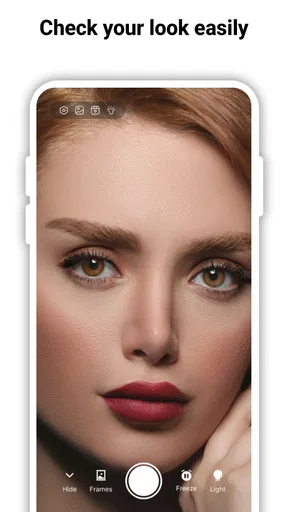
The main choice is whether you want a mirror that is always with you or a dedicated physical mirror that is easier to position and does not depend on your phone. A compact pocket mirror is simple and reliable, while a phone app can offer a closer camera view and light control in one place. This one leans into that convenience with a front-camera reflection, pinch zoom, brightness adjustment, and a freeze frame function.
I would also think about where I expect to use it. At a desk or near a window, the camera view can be an easy way to check a small detail. On a crowded commute, holding a phone close to your face may feel awkward, and the screen cannot show the same broad view as a wall mirror. Its strongest role is a quick, private check in a suitable spot—not a universal replacement for every mirror.
First Impressions
Right off the bat, the app’s interface is clean and straightforward. There’s no clutter, which I appreciate. Upon launching the app, you’re greeted with a functional mirror that uses your phone’s front camera. The reflection is clear, and surprisingly, there’s no lag, which is a common issue with similar apps.
The app doesn’t bombard you with ads, which is a massive plus. I mean, who wants to be interrupted by an ad when you’re trying to fix your hair?
It is a free beauty app from TAKA TECHNOLOGY VN CO., LTD, and it has a 4.1 average from 22 ratings, with 10K+ installs. That gives a prospective user a sense of its modest footprint, but I would treat the rating as a starting point rather than proof that it will suit every phone or routine. The app is rated for Everyone, and its current version is 1.0.7; it was released on May 10, 2025. It requires Android 7.0 or newer, so an older Android device may not be able to run it.
Worth Reading Before You Choose

Flipboard Shows What News Apps Must Do Beyond the Feed

Switching to Android Auto Means Rethinking Your Driving Routine

Google Calendar Makes a Crowded Week Easier to Manage

Ludo King Makes the Most of the Minutes Between Plans

Baby Panda World Brings Quick Play to Modern Phones, but Its Game Library Feels Busy

ESPN’s Live Game View Makes Following Close Games Easier
Features Worth Noting
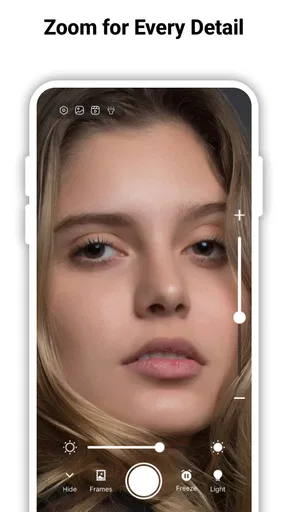
The standout feature of True Mirror: Magnifying Mirror is its magnification capability. You can zoom in and out with a simple pinch, which is super handy for those times you need a closer look at your makeup or a pesky blemish. The zoom is smooth, and the image quality remains sharp even at higher magnifications.
There’s also a handy brightness adjustment feature. You can tweak the brightness to suit your environment, ensuring you always have the perfect lighting. This is particularly useful in dimly lit spaces where your phone’s flash isn’t an ideal solution.
For the best result, I would start with the phone at a comfortable distance, adjust brightness first, and only then zoom in. That order helps me avoid mistaking a close, enlarged view for how my face or makeup looks at normal distance. I would also check the image near a window or under the lighting where I will actually be seen; screen brightness can make details easier to inspect, but it cannot accurately reproduce every room’s light.
The combination is particularly handy for a precise, limited task: checking whether a lash has smudged, spotting a stray hair, or seeing if lipstick has gone beyond its edge. For those checks, zoom can save the effort of leaning close to a bathroom mirror. For blending or judging the whole face, I would zoom back out and use a larger mirror if one is available.
Usability and Performance
Using the app is as simple as it gets. You open it, and it’s ready to go. I didn’t experience any crashes or glitches during my time with it, which is a testament to its stability. It runs smoothly on both Android and iOS, and the app size is pretty lightweight, so it won’t hog your device’s storage.
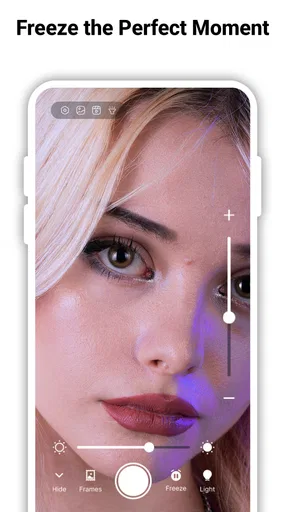
The app includes a nifty freeze frame function. You can tap on the screen to freeze your reflection, allowing you to analyze your look without holding the phone awkwardly. I found this feature surprisingly useful for checking my outfit from different angles.
That pause is most valuable when I need to compare a small detail without trying to keep my hand perfectly still. I can freeze the view, inspect it, then return to the live image for another angle. It is less useful for checking movement or how a look changes in different light, so I would treat it as a momentary reference rather than a saved record of how I look throughout the day.
A realistic use is getting ready in a shared bathroom: I can step aside, use the front camera to check a collar or a quick makeup touch-up, and freeze the image while I adjust something with my free hand. Another is a last check in an office washroom before an appointment. In both cases, the benefit is speed and portability; the trade-off is that I still need a stable grip and enough personal space to hold the phone comfortably.
Functional and Fun
While the app is primarily functional, it’s also fun to use. There’s something amusing about having a magnifying mirror on your phone, and it’s a neat party trick to show friends. Plus, the app’s lack of ads makes it a pleasure to use without distractions.
Compared with a basic camera app, a dedicated mirror is appealing because the purpose is immediate: open it to see yourself, rather than navigate camera controls or risk switching into a photo-taking workflow. A physical compact mirror remains quicker when the phone is in a bag or its battery is low. A fixed vanity mirror is still preferable for longer routines, since it is easier to position and offers a broader view. I would choose this app when portability and close inspection matter more than hands-free use or a wide reflection.
One small habit makes the experience more practical: keep the phone’s lens clean. Fingerprints can soften a close view, and zoom makes that softness more noticeable. I would also avoid using maximum magnification as the only way to judge a blemish or makeup edge; close-up inspection can make minor texture seem more prominent than it appears at conversational distance.
There is a cost consideration too. The app is free to install, while in-app purchases are listed at $14.99–$49.99 per item. I would begin with the free experience and decide whether the basic mirror tools actually fit my routine before considering any purchase. Anyone who only needs an occasional reflection may have no reason to spend extra, while someone who wants more than the free use offers should check the purchase details in the app before committing.
It is not the right choice if you want a broad, hands-free view, dependable assessment of makeup under controlled lighting, or a tool for photographing your appearance. In those situations, a physical mirror, a well-lit vanity setup, or the regular camera may be more appropriate. Nor would I rely on a phone screen as the sole judge of color: screen settings and surroundings can affect how shades appear.
Who it suits, and when I would skip it
I would recommend it to people who often need a quick grooming check away from home, especially anyone who likes being able to zoom in on a small detail. It may also suit someone who has misplaced pocket mirrors or wants one less separate item to carry. Its uncomplicated layout is a plus for a person who wants to open the app and look, rather than learn a complicated beauty tool.
I would skip it if I rarely use my phone for grooming, dislike holding a device near my face, or need a stable, full-length view while getting ready. The same goes for anyone who expects a camera-based reflection to behave exactly like a high-quality glass mirror. A phone is convenient, but positioning, screen glare, and the camera view all affect the experience.
Final Thoughts
So, if you’re looking for a reliable mirror app that offers more than just a basic reflection, give True Mirror: Magnifying Mirror a try. It’s a solid choice for anyone who needs a quick and easy way to check their appearance on the go. The magnification feature is a game changer, and the app’s simplicity makes it accessible to everyone.
In a world where convenience is key, having this app on your phone is like having a little pocket mirror that’s always ready to serve. So go ahead, download it, and see for yourself why it’s quickly becoming a favorite among users.
My practical recommendation is to think of it as a handy backup mirror with useful close-up controls, not as a substitute for every grooming setup. If that is what you need, its straightforward approach makes it easy to try; if your routine depends on broad framing, hands-free positioning, or controlled lighting, a physical mirror will serve you better.
Pros
- High-quality magnification for detailed views.
- User-friendly interface with intuitive controls.
- Adjustable brightness for varied lighting needs.
- No intrusive ads disrupt usage.
- Quick access with one-touch activation.
Cons
- Limited features compared to competitors.
- Occasional lag on older devices.
- Battery drain with prolonged use.
- Requires camera permissions to function.
- No offline functionality available.
FAQs for True Mirror: Magnifying Mirror
What is True Mirror: Magnifying Mirror and how does it work?
True Mirror: Magnifying Mirror is an app designed to turn your mobile device into a magnifying mirror. It utilizes your device's camera to provide a clear, enlarged view of your reflection. This is particularly useful for tasks requiring precision, such as makeup application or grooming. The app offers various magnification levels and lighting adjustments for optimal visibility.
Is True Mirror: Magnifying Mirror free to use?
True Mirror: Magnifying Mirror offers a free version with basic features. However, to access advanced functionalities, such as higher magnification levels and ad-free experience, users may need to upgrade to the premium version, which requires a purchase. Always check the app store for the latest pricing details and promotions.
What are the key features of True Mirror: Magnifying Mirror?
The app provides several features including adjustable magnification levels, customizable lighting, and a freeze frame option to capture a still image. It also offers a user-friendly interface, allowing for easy navigation. These features make it an excellent tool for both casual and professional use.
Does True Mirror: Magnifying Mirror drain battery quickly?
Like any app that utilizes the camera, True Mirror: Magnifying Mirror can consume more battery than standard apps. However, it is optimized for efficiency, ensuring that battery usage is minimized. Users are encouraged to monitor their device's battery while using the app, especially during extended use.
Is True Mirror: Magnifying Mirror safe to download and use?
Yes, True Mirror: Magnifying Mirror is safe to download from reputable app stores like Google Play Store and Apple App Store. It complies with standard security protocols to protect user data. It’s always advisable to ensure your device has the latest security updates for a safe experience.


